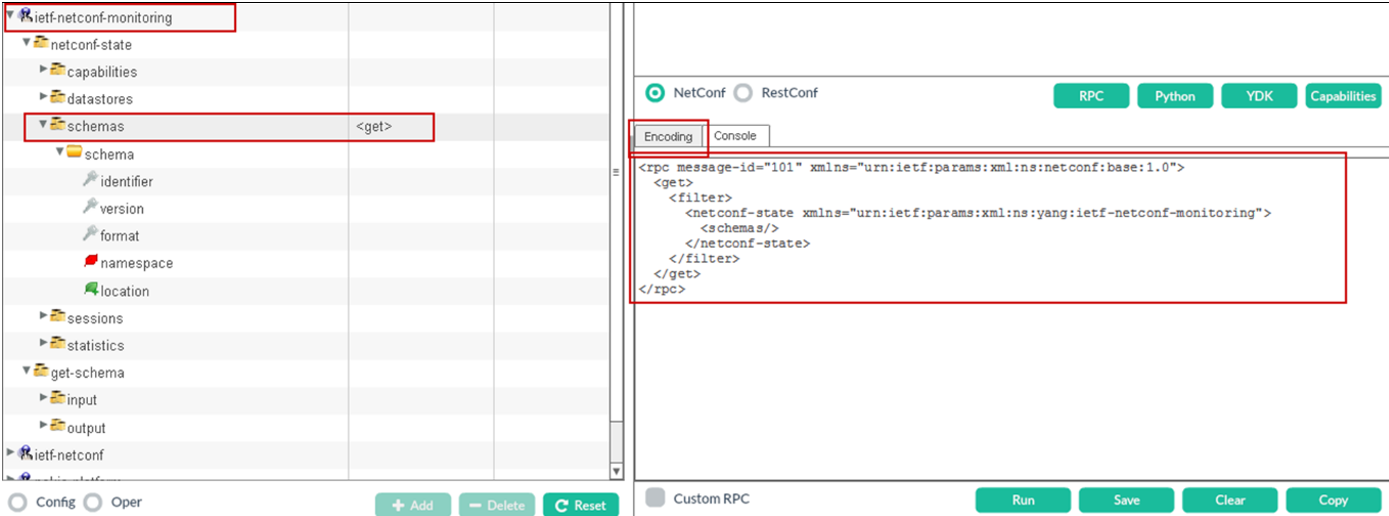
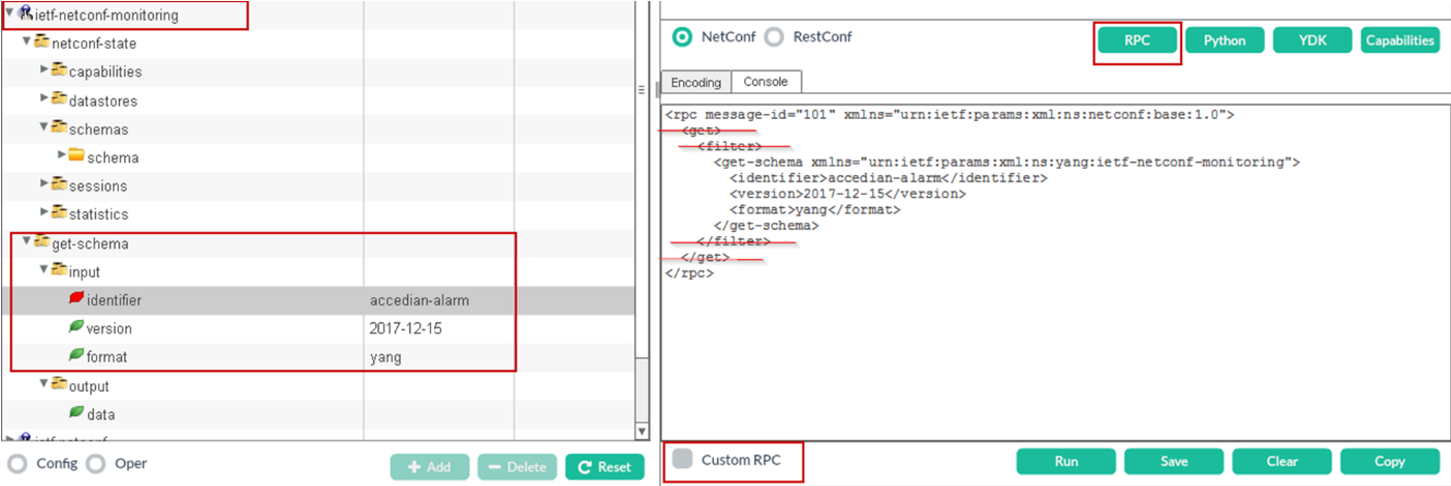
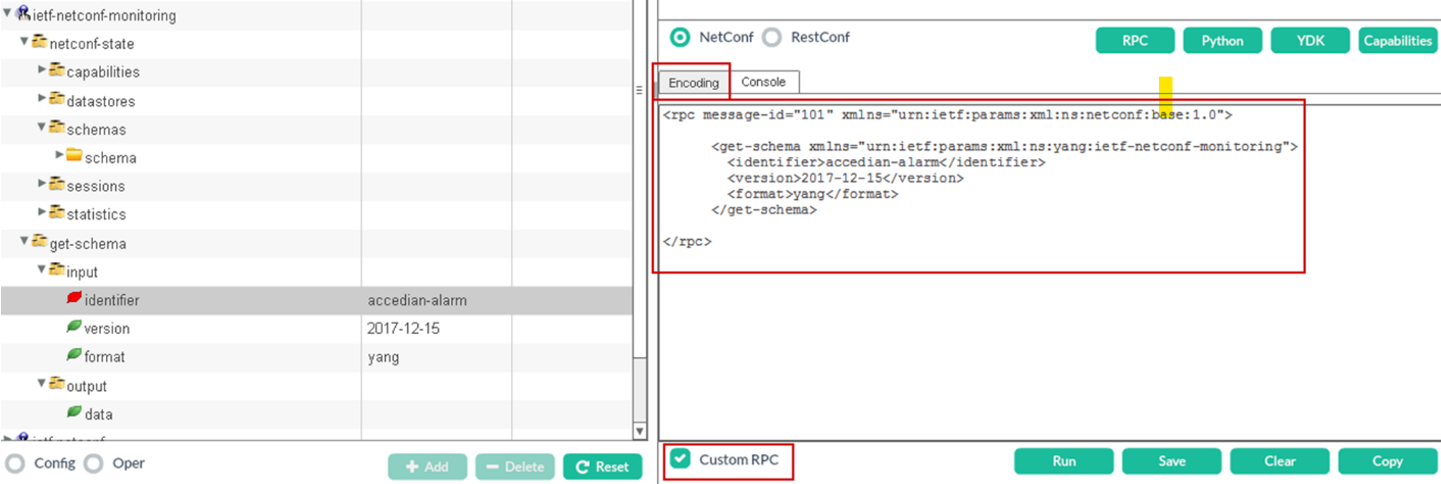
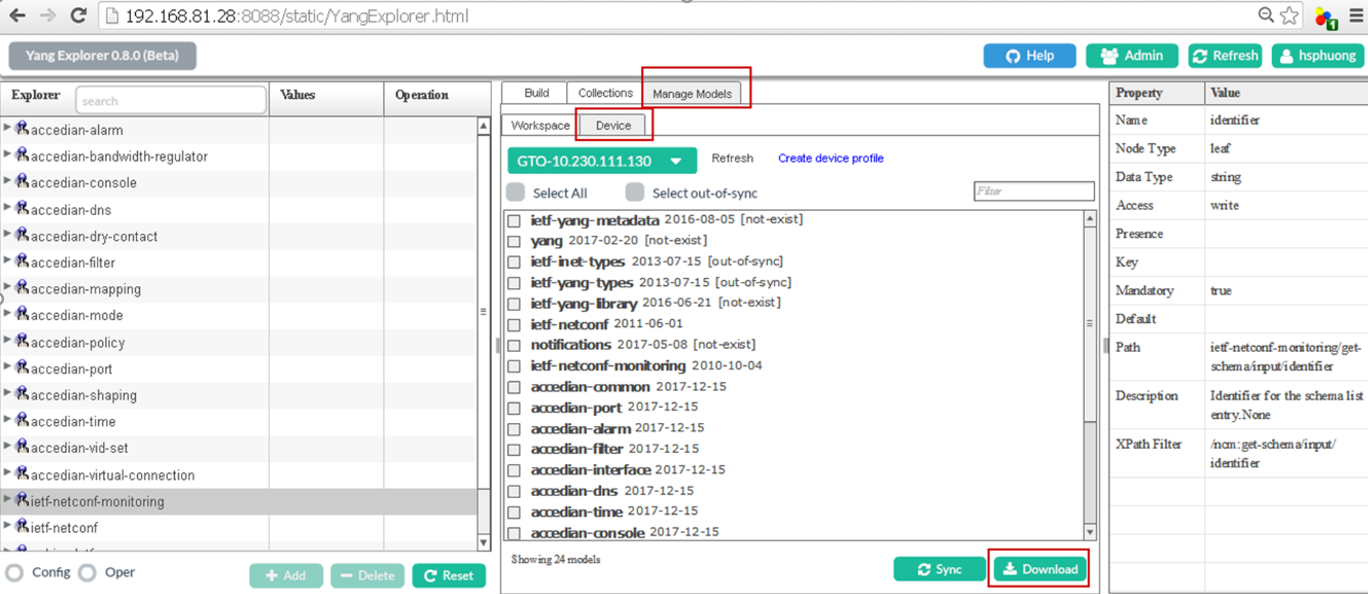
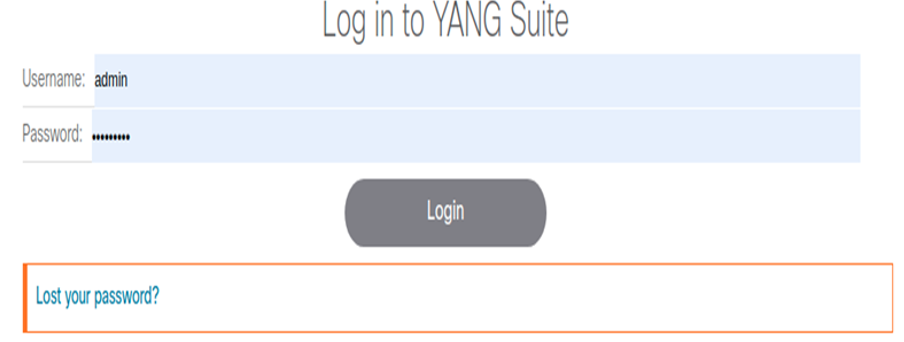
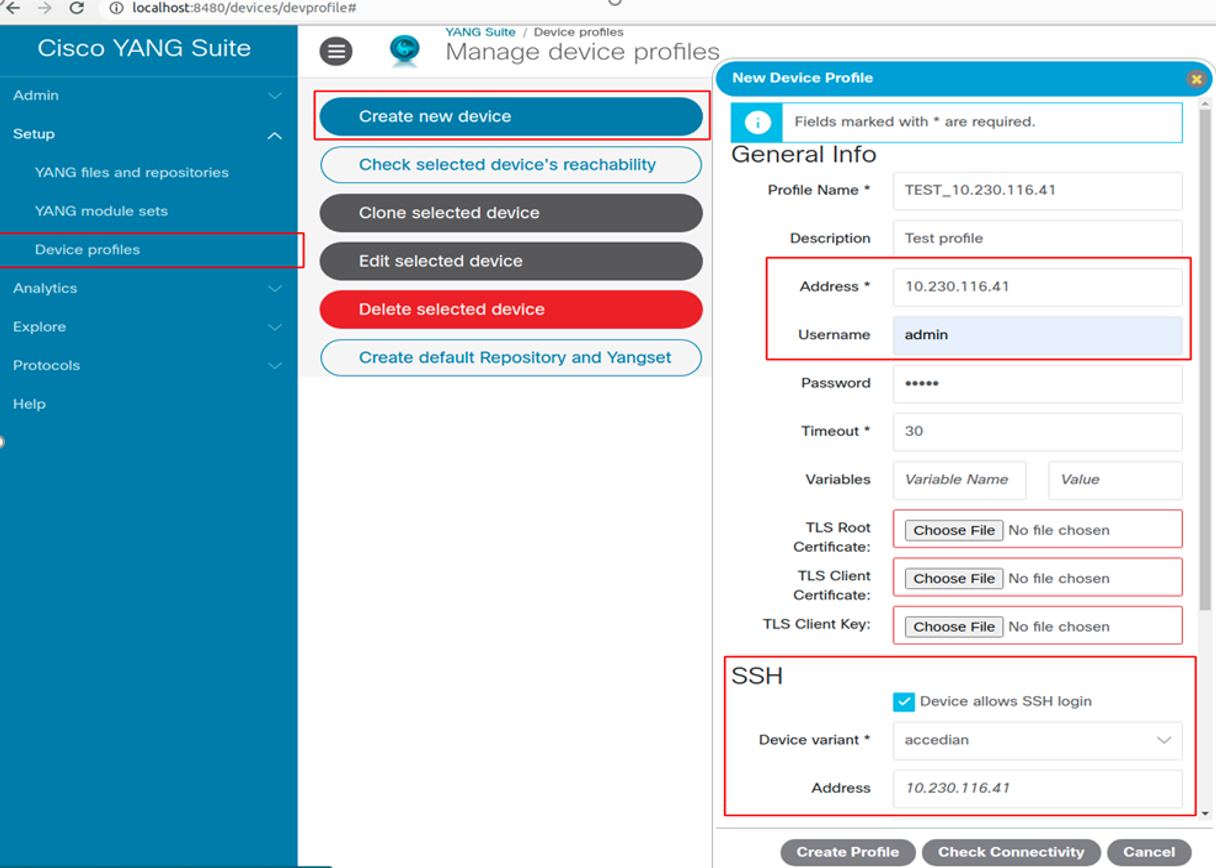
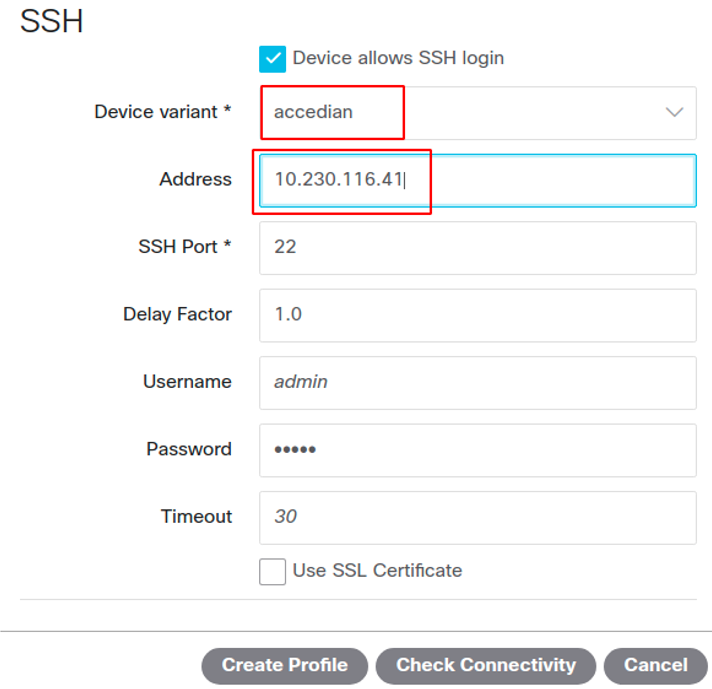
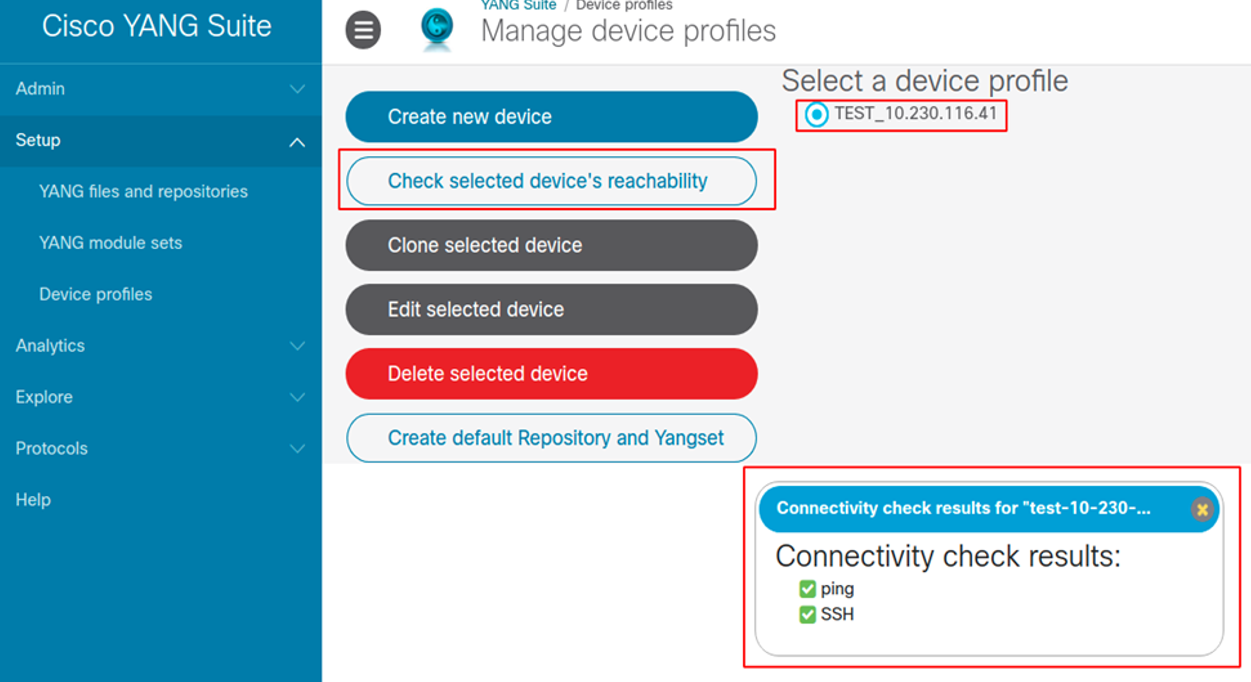
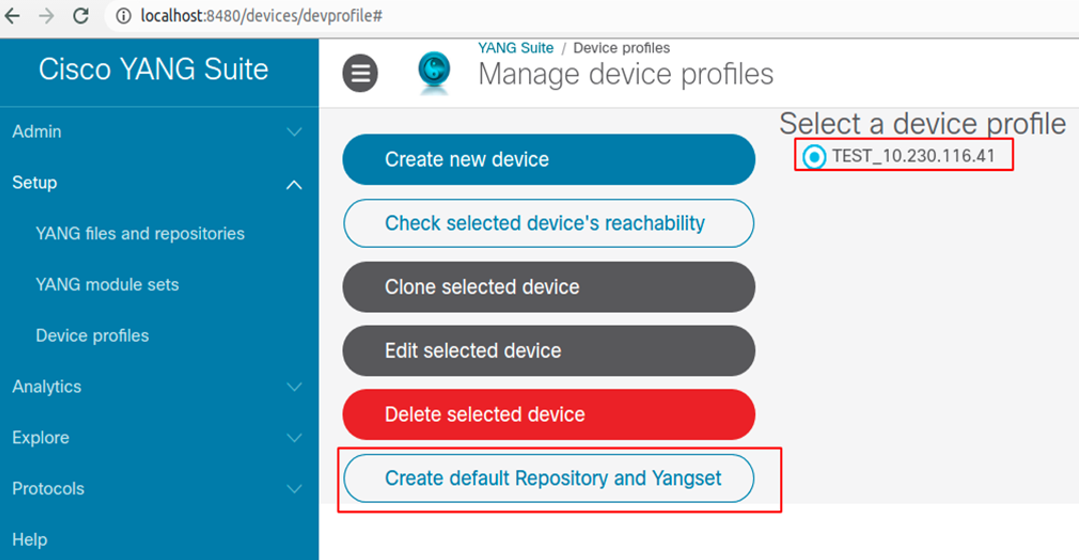
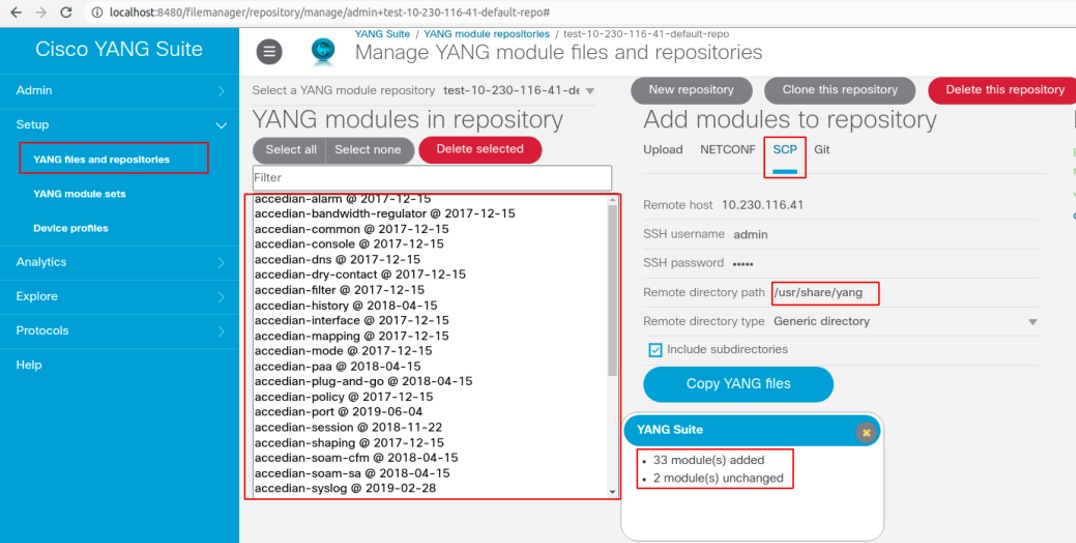
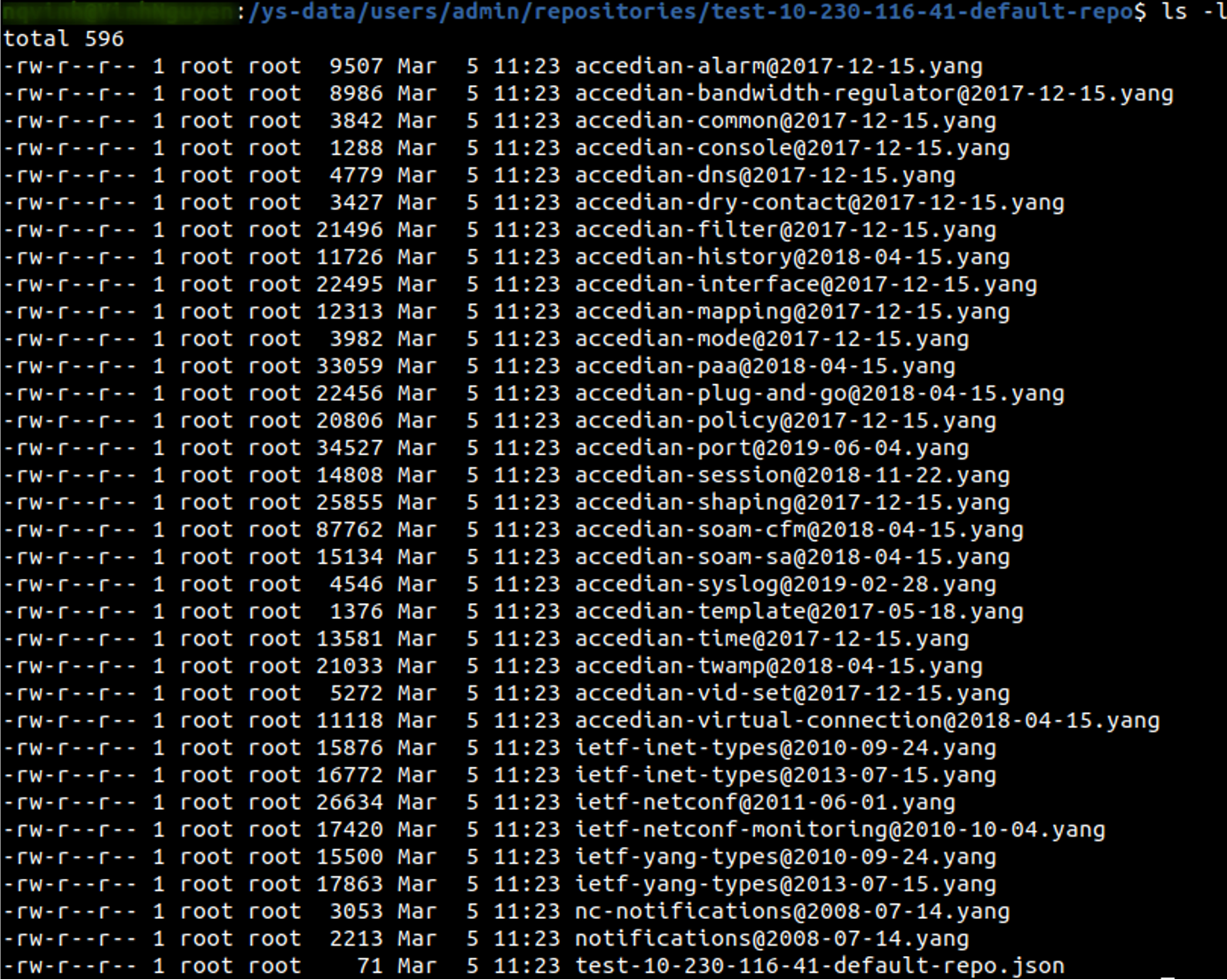
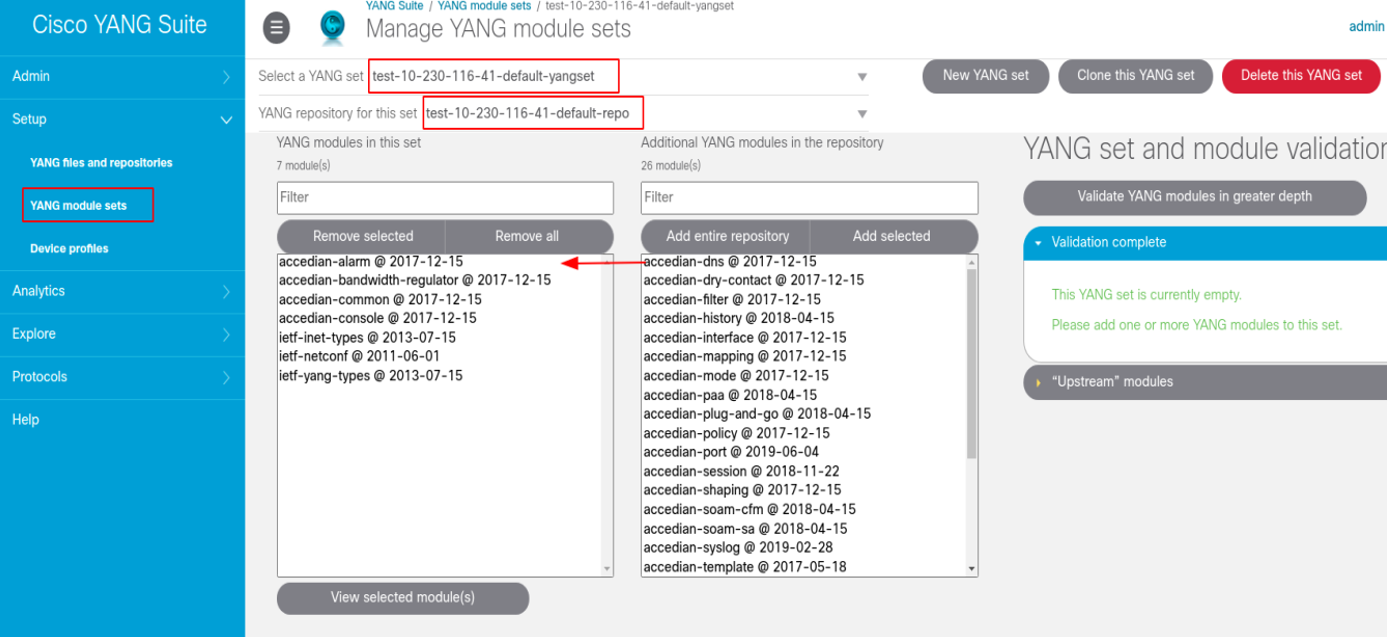
--- title: "Obtain the YANG Model" slug: "acquiring-the-yang-model-gt" tags: ["YANG model", "SSH", "Assurance Sensors", "Assurance Sensor GT", "Assurance Sensor GT-S"] updated: 2026-07-07T13:33:25Z published: 2025-07-31T18:33:07Z canonical: "docs.crossworkassurance.cisco.com/acquiring-the-yang-model-gt" --- > ## Documentation Index > Fetch the complete documentation index at: https://docs.crossworkassurance.cisco.com/llms.txt > Use this file to discover all available pages before exploring further. # Obtain the YANG Model The Yet Another Next Generation (YANG) models are stored on the device as part of the firmware package. In order to retrieve them the user must use a NETCONF tool, for instance: - SSH console - Tools from Cisco orchestrator (e.g.: Yang Explorer): https://github.com/CiscoDevNet/yang-explorer or Cisco YANG suite: https://github.com/CiscoDevNet/yangsuite - Tools from MG-Soft (e.g.: MG Soft NETCONF Browser) #### Basic SSH Console NETCONF Tool For the most basic NETCONF tool, SSH console, YANG models can be acquired by sending specific requests. **Note:** Both NETCONF request and response are in XML format. **To send the proper requests:** 1. Connect Accedian NETCONF device by entering: ssh admin@10.230.111.130 -p 830 -s netconf 2. Send HELLO message to device by entering: < ?xml version="1.0" encoding="UTF-8"? >
< hello xmlns="urn:ietf:params:xml:ns:netconf:base:1.0" >
< capabilities >
< capability >urn:ietf:params:netconf:base:1.0< /capability>
< /capabilities >
< /hello >
]]>]]>
3. Send the request to acquire information regarding all available YANG schema by entering: < rpc message-id="101" xmlns="urn:ietf:params:xml:ns:netconf:base:1.0" >
< get >
< filter >
< netconf-state xmlns="urn:ietf:params:xml:ns:yang:ietf-netconf-monitoring"
< schemas/ >
< /netconf-state >
< /filter >
< /get >
< ]>]]>
4. Send the request to acquire a specific YANG schema, for example “accedian-alarm” model, by entering: < rpc message-id="101" xmlns="urn:ietf:params:xml:ns:netconf:base:1.0" >
< get-schema xmlns="urn:ietf:params:xml:ns:yang:ietf-netconf-monitoring" >
< identifier >accedian-alarm< /identifier >
< version >2017-12-15< /version >
< format >yang< /format >
< /get-schema >
< /rpc >
]]>]]>
5. Close the session by entering: < rpc message-id="101"
xmlns="urn:ietf:params:xml:ns:netconf:base:1.0" >< close-session/ >
< /rpc >]]>]]>
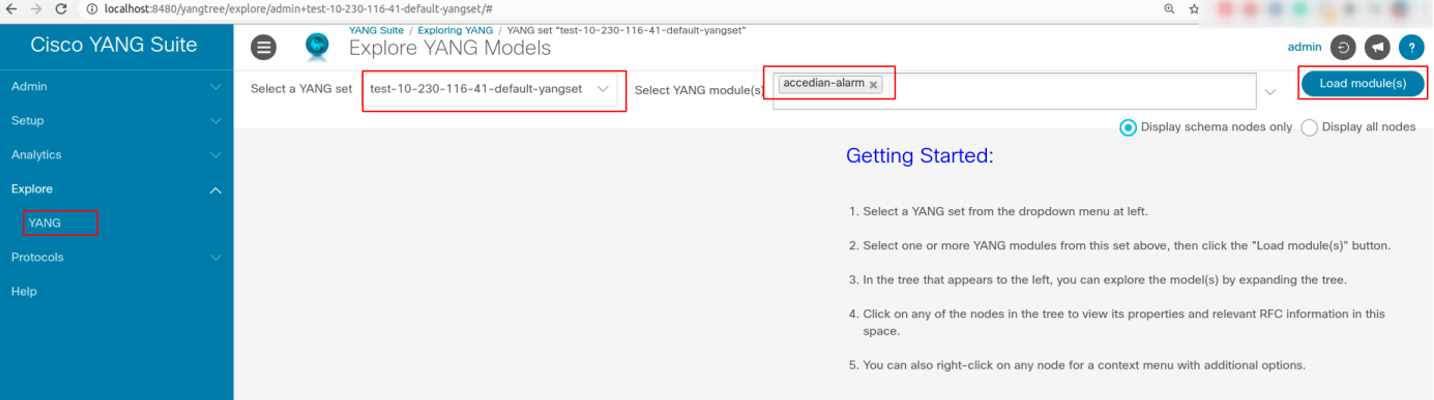
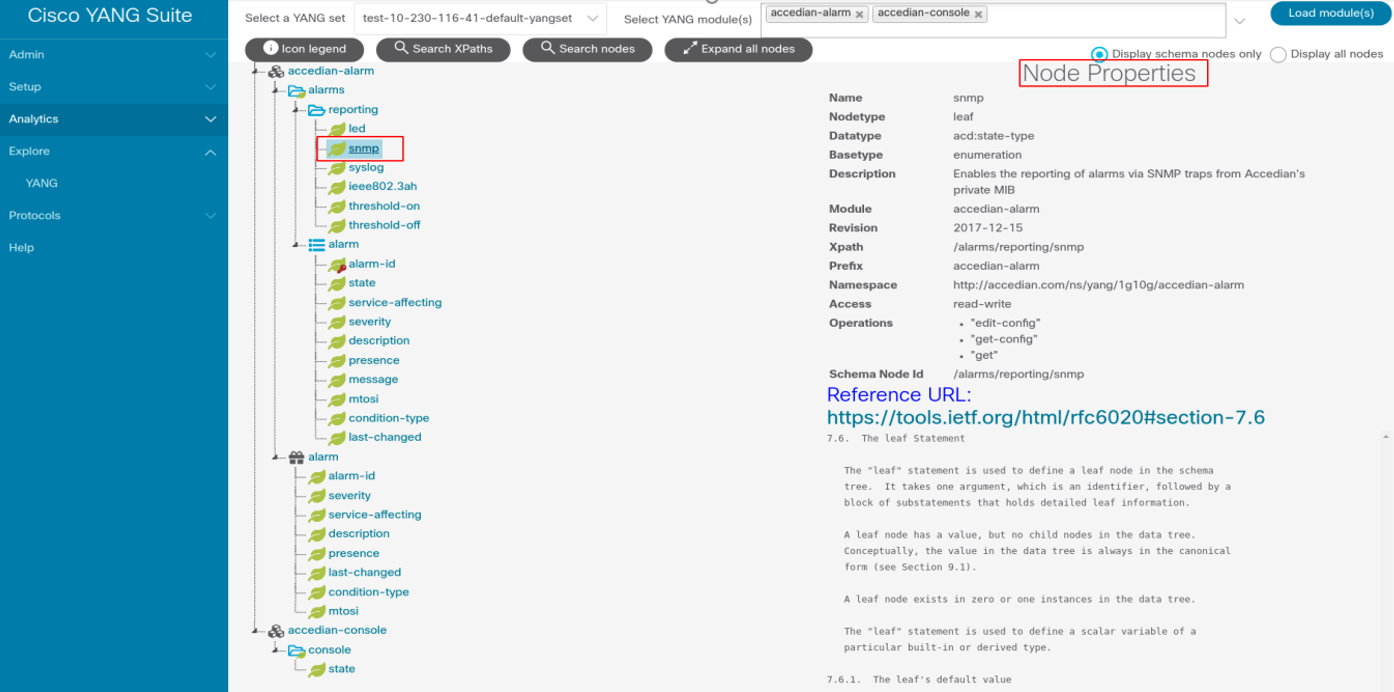
#### Additional UI NETCONF Tools For additional UI NETCONF tools (YANG Explorer, or MG Soft NETCONF browser), the Accedian device must be connected prior to running the corresponding built-in UI functions. **To acquire YANG models by using YANG Explorer:** 1. The overview information regarding all YANG schemas on the device can be listed as shown below: ![Skylight element LX v7.9_8.bmp](https://cdn.document360.io/01d1de5e-a375-4fbc-aa82-666ac04c2113/Images/Documentation/Skylight%20element%20LX%20v7.9_8%281%29.bmp?sv=2026-02-06&spr=https&st=2026-11-16T06%3A18%3A28Z&se=2026-11-16T07%3A18%3A28Z&sr=b&sp=r&sig=WrfrfLKHKQZ8iuCgbu3CuoupVAjY%2Fvmo6LGndyAVwXA%3D) 2. The request can be sent in order to get a specific YANG file. Note that the RPC created automatically by YANG Explorer will not work. The request must be customized by removing the lines that read < get > and < filter >. ![Skylight element LX v7.9_9.bmp](https://cdn.document360.io/01d1de5e-a375-4fbc-aa82-666ac04c2113/Images/Documentation/Skylight%20element%20LX%20v7.9_9.bmp?sv=2026-02-06&spr=https&st=2026-11-16T06%3A18%3A28Z&se=2026-11-16T07%3A18%3A28Z&sr=b&sp=r&sig=l%2BoILxto8RtFVIhGVVlSmqRGX2RNitMErqzXJAnw3us%3D) ![Skylight element LX v7.9_10.bmp](https://cdn.document360.io/01d1de5e-a375-4fbc-aa82-666ac04c2113/Images/Documentation/Skylight%20element%20LX%20v7.9_10.bmp?sv=2026-02-06&spr=https&st=2026-11-16T06%3A18%3A28Z&se=2026-11-16T07%3A18%3A28Z&sr=b&sp=r&sig=eI3%2B9hmMud1Qqoi0Q%2FcMpD2SRID5jk0MkZbm9PBOgWc%3D) 3. YANG Explorer 0.8.0 (Beta) supports the functionality to download YANG files directly, but can be unstable. ![Skylight element LX v7.9_11.bmp](https://cdn.document360.io/01d1de5e-a375-4fbc-aa82-666ac04c2113/Images/Documentation/Skylight%20element%20LX%20v7.9_11.bmp?sv=2026-02-06&spr=https&st=2026-11-16T06%3A18%3A28Z&se=2026-11-16T07%3A18%3A28Z&sr=b&sp=r&sig=tXCF2JjpCjLiIvSl%2FEKCXdYeY9ukdAW9a0HT99rJ%2FAo%3D) **To acquire YANG models by using YANG Suite:** 1. Install Cisco YANG Suite: https://github.com/CiscoDevNet/yangsuite (Cisco YANG Suite document: https://developer.cisco.com/docs/yangsuite/ ) 2. Access Docker via WEB browser: a. Login: http://localhost:8480/ ![Skylight element LX v7.9_12.bmp](https://cdn.document360.io/01d1de5e-a375-4fbc-aa82-666ac04c2113/Images/Documentation/Skylight%20element%20LX%20v7.9_12.bmp?sv=2026-02-06&spr=https&st=2026-11-16T06%3A18%3A28Z&se=2026-11-16T07%3A18%3A28Z&sr=b&sp=r&sig=ycGCphDuLJoqm%2FSiyL2%2B%2FH2JfwRojA6XvLUnlkVIlIg%3D) b. Create a new device profile and SSH session: ![Skylight element LX v7.9_13.bmp](https://cdn.document360.io/01d1de5e-a375-4fbc-aa82-666ac04c2113/Images/Documentation/Skylight%20element%20LX%20v7.9_13.bmp?sv=2026-02-06&spr=https&st=2026-11-16T06%3A18%3A28Z&se=2026-11-16T07%3A18%3A28Z&sr=b&sp=r&sig=%2F44pqz54AW4Iyl9onr8GBZKzXj6OhKs10wF6DG2WoX0%3D) ![Skylight element LX v7.9_14.bmp](https://cdn.document360.io/01d1de5e-a375-4fbc-aa82-666ac04c2113/Images/Documentation/Skylight%20element%20LX%20v7.9_14.bmp?sv=2026-02-06&spr=https&st=2026-11-16T06%3A18%3A28Z&se=2026-11-16T07%3A18%3A28Z&sr=b&sp=r&sig=ROsVLknzLwkIdu2NXrQsRowdu10%2Fwp5VRjzBTGWTi4k%3D) c. Check the connection to profile created: ![Skylight element LX v7.9_15.bmp](https://cdn.document360.io/01d1de5e-a375-4fbc-aa82-666ac04c2113/Images/Documentation/Skylight%20element%20LX%20v7.9_15.bmp?sv=2026-02-06&spr=https&st=2026-11-16T06%3A18%3A28Z&se=2026-11-16T07%3A18%3A28Z&sr=b&sp=r&sig=RQRJgbRZXQ4gS7cFqnRfQlB%2FE9obrTk80Ugg8xIVngc%3D) d. Create default Repository and YANG set from profile created: ![Skylight element LX v7.9_16.bmp](https://cdn.document360.io/01d1de5e-a375-4fbc-aa82-666ac04c2113/Images/Documentation/Skylight%20element%20LX%20v7.9_16.bmp?sv=2026-02-06&spr=https&st=2026-11-16T06%3A18%3A28Z&se=2026-11-16T07%3A18%3A28Z&sr=b&sp=r&sig=9QC0St9u80l699z0m%2Bmlt51dRR8YgNDD7FFEu0lH3ys%3D) e. Copy yand-files from: "/usr/share/yang" ![Skylight element LX v7.9_17.bmp](https://cdn.document360.io/01d1de5e-a375-4fbc-aa82-666ac04c2113/Images/Documentation/Skylight%20element%20LX%20v7.9_17.bmp?sv=2026-02-06&spr=https&st=2026-11-16T06%3A18%3A28Z&se=2026-11-16T07%3A18%3A28Z&sr=b&sp=r&sig=0ecC9hQE2x62YDvBe8zaa81AWrYeGfr1RW3%2FSrkxv9E%3D) **Note:** Yang-files are stored in < yang-suite-data-dir >/ysdata/ users/< name > /repositories/< repo-name >. Example: /ysdata/users/admin/repositories/test-10-230-116-41-default-repo). ![Skylight element LX v7.9_18.bmp](https://cdn.document360.io/01d1de5e-a375-4fbc-aa82-666ac04c2113/Images/Documentation/Skylight%20element%20LX%20v7.9_18.bmp?sv=2026-02-06&spr=https&st=2026-11-16T06%3A18%3A28Z&se=2026-11-16T07%3A18%3A28Z&sr=b&sp=r&sig=LgaurDdWv0W%2Bx6IPy5PptAJ4ScJArYY59FuzRHMlC7Y%3D) f. Select YANG set from YANG repository: ![Skylight element LX v7.9_19.bmp](https://cdn.document360.io/01d1de5e-a375-4fbc-aa82-666ac04c2113/Images/Documentation/Skylight%20element%20LX%20v7.9_19.bmp?sv=2026-02-06&spr=https&st=2026-11-16T06%3A18%3A28Z&se=2026-11-16T07%3A18%3A28Z&sr=b&sp=r&sig=iShxN1YaKLV6EpvBhIyEWYSRdpU6Af9nGDhIOT3kPoY%3D) g. Load modules and explore YANG models ![Skylight element LX v7.9_20.bmp](https://cdn.document360.io/01d1de5e-a375-4fbc-aa82-666ac04c2113/Images/Documentation/Skylight%20element%20LX%20v7.9_20.bmp?sv=2026-02-06&spr=https&st=2026-11-16T06%3A18%3A28Z&se=2026-11-16T07%3A18%3A28Z&sr=b&sp=r&sig=F5FCvHO25evbvrWOtekMikV9aTkhtW6GBHCzLjEml8Q%3D) ![Skylight element LX v7.9_21.bmp](https://cdn.document360.io/01d1de5e-a375-4fbc-aa82-666ac04c2113/Images/Documentation/Skylight%20element%20LX%20v7.9_21.bmp?sv=2026-02-06&spr=https&st=2026-11-16T06%3A18%3A28Z&se=2026-11-16T07%3A18%3A28Z&sr=b&sp=r&sig=G1Novu%2Fx5EDmv%2BO1hz2Rp8eEuMVh2N8THIydvM5LkaM%3D) **© 2026 Cisco and/or its affiliates. All rights reserved.** For more information about trademarks, please visit: [Cisco trademarks](https://www.cisco.com/c/en/us/about/legal/trademarks.html)[](https://www.cisco.com/c/en/us/about/legal/trademarks.html) For more information about legal terms, please visit: [Cisco legal terms](https://www.cisco.com/c/en/us/about/legal/terms-conditions.html)